How do I avoid or lift suspension while my card is being replaced?
Our system automatically charges the 15% platform fee two days after a session is completed, using the card saved to your account.
If the first payment attempt fails, we schedule one final attempt roughly 48 hours later. If that attempt also fails, your account is temporarily paused until the outstanding booking fees are paid.
Can I get more time before my account is paused?
Because the payment schedule is fully automated, the final attempt cannot be delayed and we are unable to grant an extension. This also applies when the failure is caused by insufficient funds or a card that has expired, been lost, stolen, or is otherwise unavailable.
The good news is that a payment-related pause is only temporary. As soon as your card is working and enough funds are available, simply sign in and pay the outstanding fees. Your account is restored automatically once all outstanding booking fees have been successfully paid. There's no need to contact us.
Update your card while your account is active
Replacing your card before the payment date is the easiest way to avoid a pause:
- Click the Menu (your profile photo in the top right corner).
- Select Settings.
- Scroll down and click Payment details.
- Click Edit / Update Card to enter your new card information.
Direct link: Payment details
Restore a paused account
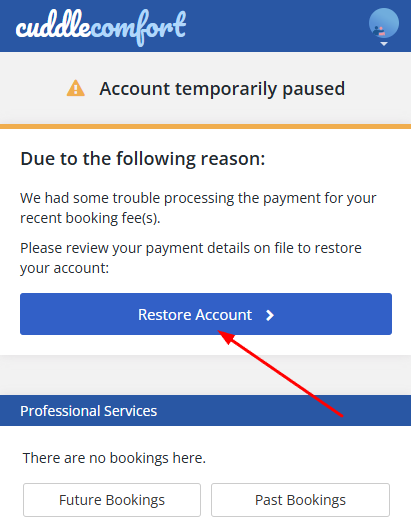
If your account has already been paused, you can restore it yourself in a few steps:
- Sign in and go to the Home page.
- Click Restore Account.
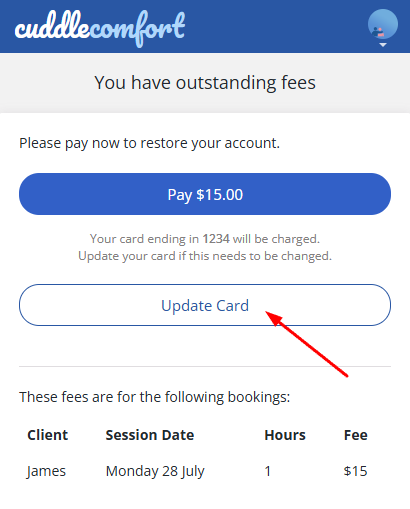
- Click Update Card and enter your new card details if needed.
- Click Pay to complete the outstanding charge and restore your account access.
Direct link: Restore Account