How do I give someone Karma?
Before you can leave Karma, you must have a completed booking with the member, or you and the member must each have sent at least 2 messages to the other.
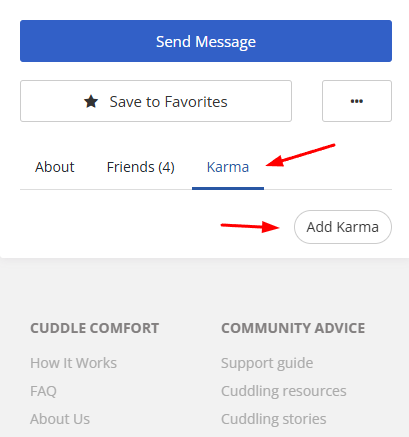
To leave Karma for another member:
- Visit their Profile page.
- Click the Karma tab.
- Enter your comment in the text box.
Important: Karma can only be left if you've met the member in person. The only exception is if the member was a 'no show' for a scheduled meeting.
Editing or deleting Karma you have left
You can click Edit to change your Karma only during the first 24 hours after you post it. After 24 hours, the Edit option is no longer available.
You can click Delete to remove your Karma at any time. There is no time limit on deleting it. When you delete Karma, the recipient's Karma total and overall rating are recalculated immediately.
If either of you has blocked the other
If you have blocked the member, or the member has blocked you, visiting their profile opens a limited blocked-member page. Any Karma you have left for that member is still visible there. You can click Edit during the first 24 hours after posting, and you can click Delete at any time.
If you delete your Karma while the block is in place, you can leave new Karma as long as you still meet the normal eligibility rules above.
The blocked-member page warns that posting Karma to retaliate, or as a way to communicate with the blocked member, will result in a ban.
Note: You can leave new Karma for a deactivated member if you meet the normal eligibility rules and either of you sent a message to the other within the past seven days. Select Add Karma on their profile.