How do I reset my password?
If you've forgotten your username or password, you can regain access using the email address associated with your account.
Forgot your username?
You don't need your username to log in. Enter the email address associated with your account in the Username or email field, along with your usual password.
If you've also forgotten your password, reset it using that same email address, then log in with your email and new password.
Reset your password
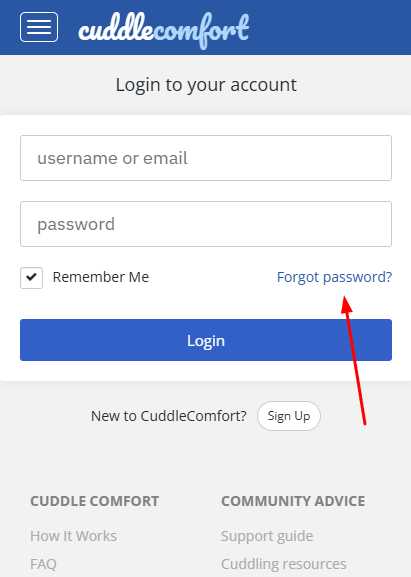
- Visit the Login page.
- Click Forgot password?
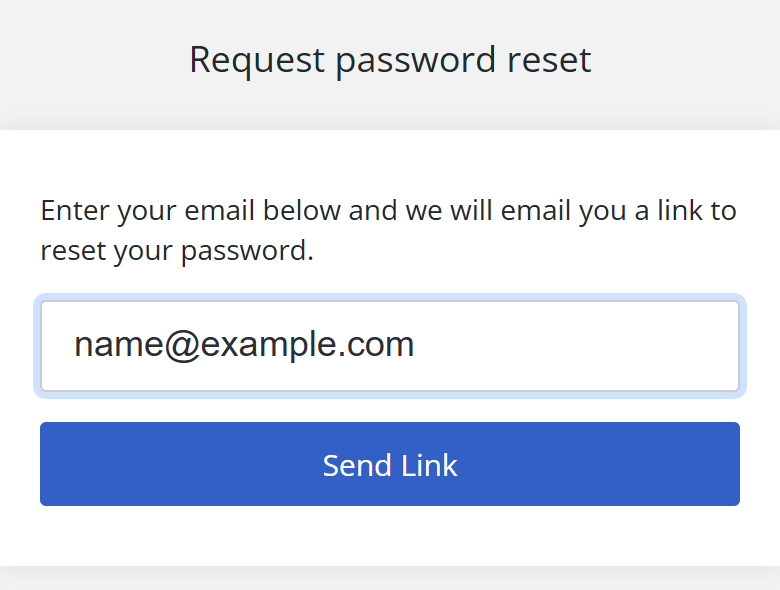
- Enter the email address associated with your account.
- Click Send Link.
- Open your email inbox and click the link we sent you. If you don't see the email, check your Spam or Junk folder.
Direct link: Password reset page
Still not receiving the email?
Make sure the email address you entered is the one associated with your account, and check your Spam or Junk folder. If you've done both and still haven't received the reset email, use the Contact form.
Include your username if you remember it, your account email address, and what happens after you click Send Link. If no message appears, say so. Do not send your password or a password-reset link.