How do I report a member?
Use the Report feature when a member's behavior needs moderator review. Always report through the site's official reporting controls, not the contact form, because reports need to enter the moderation system directly.
If someone is simply rude or you no longer want contact with them, block them instead. See How do I block someone?.
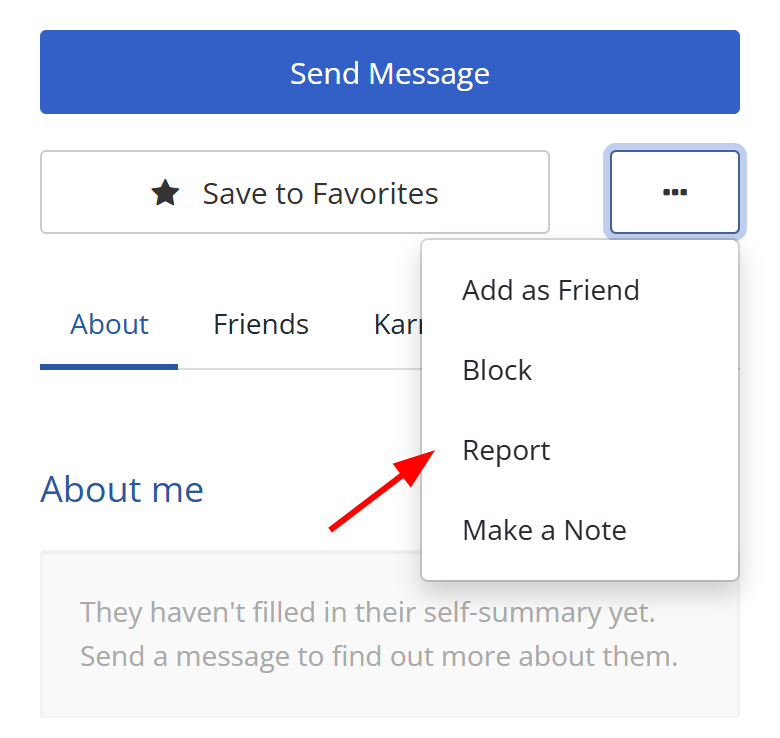
Report from a member's profile
- Go to their Profile page.
- Select the white three-dot button near Save to Favorites.
- Select Report.
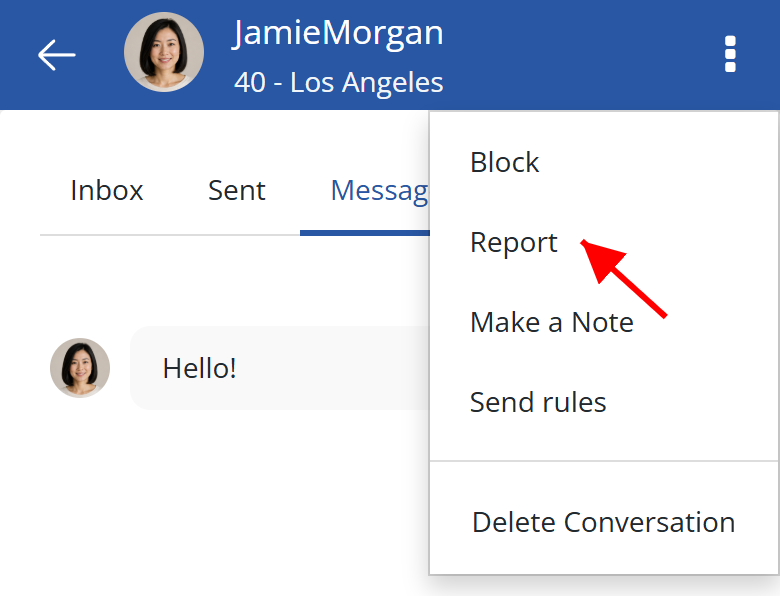
Report from your Inbox
- Open the conversation in your Inbox.
- Select the white three-dot button. On mobile, it is in the top-right corner. On larger screens, it is next to Send.
- Select Report.
If you don't know their username
Our moderators can only review a report if we can identify the specific Cuddle Comfort account involved.
To find the member, check your Inbox for your conversation with them, or check Bookings if you booked a session together. Bookings still shows their username if they have deactivated their account or started deleting it. Then report them from that conversation or their profile. You can even report a deactivated or deleting account, within the limits explained in the note below.
If you can't identify their account, we can't investigate.
If they blocked you
You can still report a member who has blocked you. When you open their profile, you will see a notice that they have blocked you, along with a Report option. You can also report them from an existing Inbox conversation using the steps above.
If they block you after you submit a report, the report stays in the moderator report queue. Their block does not cancel or remove it.
Note: You can report a deactivated member from their profile if either of you has sent a message to the other. If they start the account-deletion process, Report remains available for 14 days from that date, unless their account is permanently removed sooner. After 14 days, reporting is no longer available, even if their account is still awaiting deletion.
Add information or correct a report
Once submitted, a report cannot be edited, withdrawn, or deleted.
If your report has an open ticket, you will see an Open reports box above your Inbox. Open the ticket to add a comment or upload screenshots. Use this route first so your new information stays with the open ticket. If a moderator asks you for more information, you will also receive an email. Actioned reports cannot receive member replies, so a closed ticket may no longer appear or accept a reply.
If there is no open ticket, or it no longer accepts replies, submit a separate follow-up report only if you need to correct a material mistake, have useful new evidence, or circumstances have substantially changed:
-
Report the same profile again. If you reported them recently, wait for the countdown shown on screen to finish.
-
Select Other.
-
Start the description with one of these:
Supplement to my earlier report about [username]: [new information].
or
Correction: I previously reported [username] by mistake. Please disregard my earlier report.
-
Add the relevant details and attach screenshots that support them.
This creates a separate report. It does not edit, reopen, withdraw, replace, or bump your original report, and it does not speed up or guarantee a moderation outcome.
Incidents that involve a crime
If you believe you may be the victim of a crime, contact local law enforcement. If you are in immediate danger, get to safety and contact emergency services first. Cuddle Comfort support is not an emergency service and cannot investigate crimes.
When it is safe, report the member and block them on Cuddle Comfort.